

EcoPhi Portal Structure
Watch this video to get an overview of how the EcoPhi portal is structured:
1.1 Organization structure
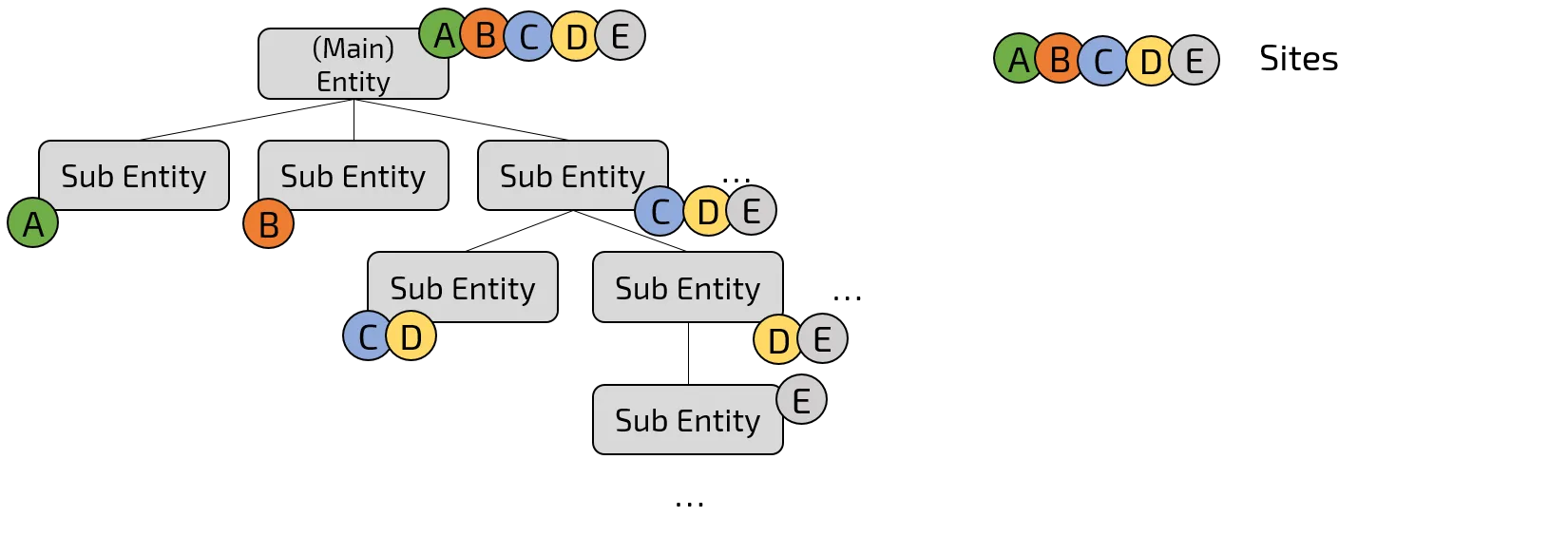
The following picture shows how Organizations and Sub-Organizations as well as Sites are structured on the EcoPhi Portal.
1.2 Site structure
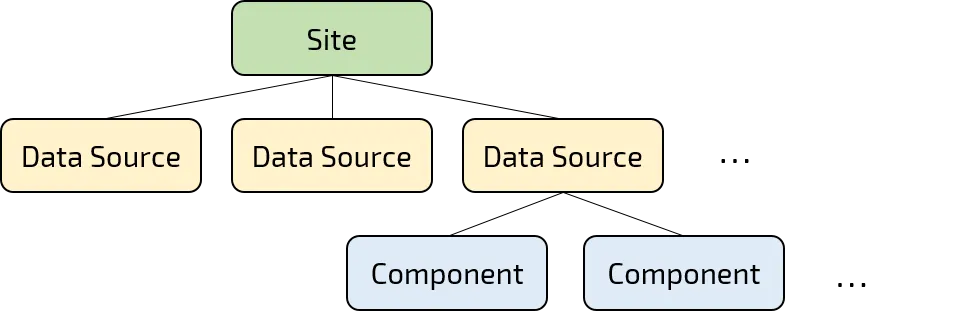
The following picture shows how a Site on the EcoPhi Portal is structured.
1.3 Main Organization
- Definition: The Organization represents the top level of the hierarchy. Typically, there is one Organization linked to one EcoPhi customer. Only an Organization can create new Sites.
- Example: A solar company using the EcoPhi platform to monitor and control multiple solar systems and facilities.
- Platform terms: A (Main) Organization using the EcoPhi platform to monitor and control multiple Sites.
1.4 Sub-Organization
- Definition: Sub-Organizations are hierarchically below the Organizations and are used to organize different Sites within the organizational structure. They can’t create new Sites but may edit existing Sites if they are permitted to do so.
- Example: Different departments, subsidiaries, or end-customers of a company, each operating one or various solar systems.
- Platform terms: Different Sub-Organizations of a (Main) Organization, each operating one or various Sites.
1.5 Site
- Definition: Sites represent physical or virtual facilities and systems that aggregate one or various Data Sources. They are the actual locations or systems where data is collected and monitored.
- Example: A production plant, a data center, or a solar farm.
1.6 Data Source
- Definition: Data Sources are specific sources of data within a Site. These can either be physical devices like EcoPhi Boxes or APIs that retrieve data from external systems.
- Example: An EcoPhi Box for monitoring energy consumption or an API providing weather data for the Site.
1.7 Component
- Definition: Components are physical devices within the Data Source “EcoPhi Device” that provide measurement data.
- Example: An inverter in a solar installation, serial, analog, and digital sensors.
1.8 Roles, permissions and rules
Permissions are handled both on Organization and User level.
1.8.1 Organization Permissions
The permission to create further Sub-Organizations and edit Sites can be assigned at Sub-Organization level. Thus, actions and settings can be permitted on Sub-Organization level.
1.8.2 User Roles and Permissions
-
Owner: Owns the Organization with all permissions. The Owner automatically has access and can manage all Sub-Organizations. Each (Sub-)Organization must have at least one Owner. Permissions:
- “permissions/sites.edit”,
- “permissions/sites.create_delete”,
- “permissions/sub_entities.manage”,
- “permissions/users.manage”,
- “permissions/entity.edit”,
- “permissions/entity.critical”,
- “permissions/data_sources.view”,
- “permissions/data_analyzer.view”,
- “permissions/api_keys.manage”,
- “permissions/alerts.manage”,
- “permissions/logbook.manage”,
- “permissions/logbook.read”,
- “permissions/file_store.view”,
- “permissions/file_store.manage”
-
Manager: Have editing permissions for the (Sub-)Organizations where they are a member of. Can create and edit Sites and handle members. Permissions:
- “permissions/sites.edit”,
- “permissions/sites.create_delete”,
- “permissions/sub_entities.manage”,
- “permissions/users.manage”,
- “permissions/entity.edit”,
- “permissions/data_sources.view”,
- “permissions/data_analyzer.view”,
- “permissions/alerts.manage”,
- “permissions/logbook.read”,
- “permissions/file_store.view”,
- “permissions/file_store.manage”,
- “permissions/file_store.view”
-
Viewer: Have only viewing permissions and can’t edit. Permissions:
- “permissions/data_sources.view”,
- “permissions/data_analyzer.view”
-
Member: Have limited viewing permissions and only see the Site Overview. Permissions:
- no additional permissions
1.8.3 Rules
- (Main-)Organization members see all Sites of the (Main-)Organization.
- Sub-Organization members see all Sites that have been shared with this Sub-Organization.
- A User can be a member of several Organizations and Sub-Organizations at the same time. Users of (Main-)Organizations don’t get automatically access to Sub-Organizations but need to be added as a Sub-Organization member.